What kind of project would you trust CrewForm with first?

Official Links
Screenshots
About CrewForm
CrewForm is an open-source platform for orchestrating AI agent teams through a web UI. When we first launched, the "What's next" section mentioned an interactive workflow canvas. We shipped it. Here's how it works under the hood. 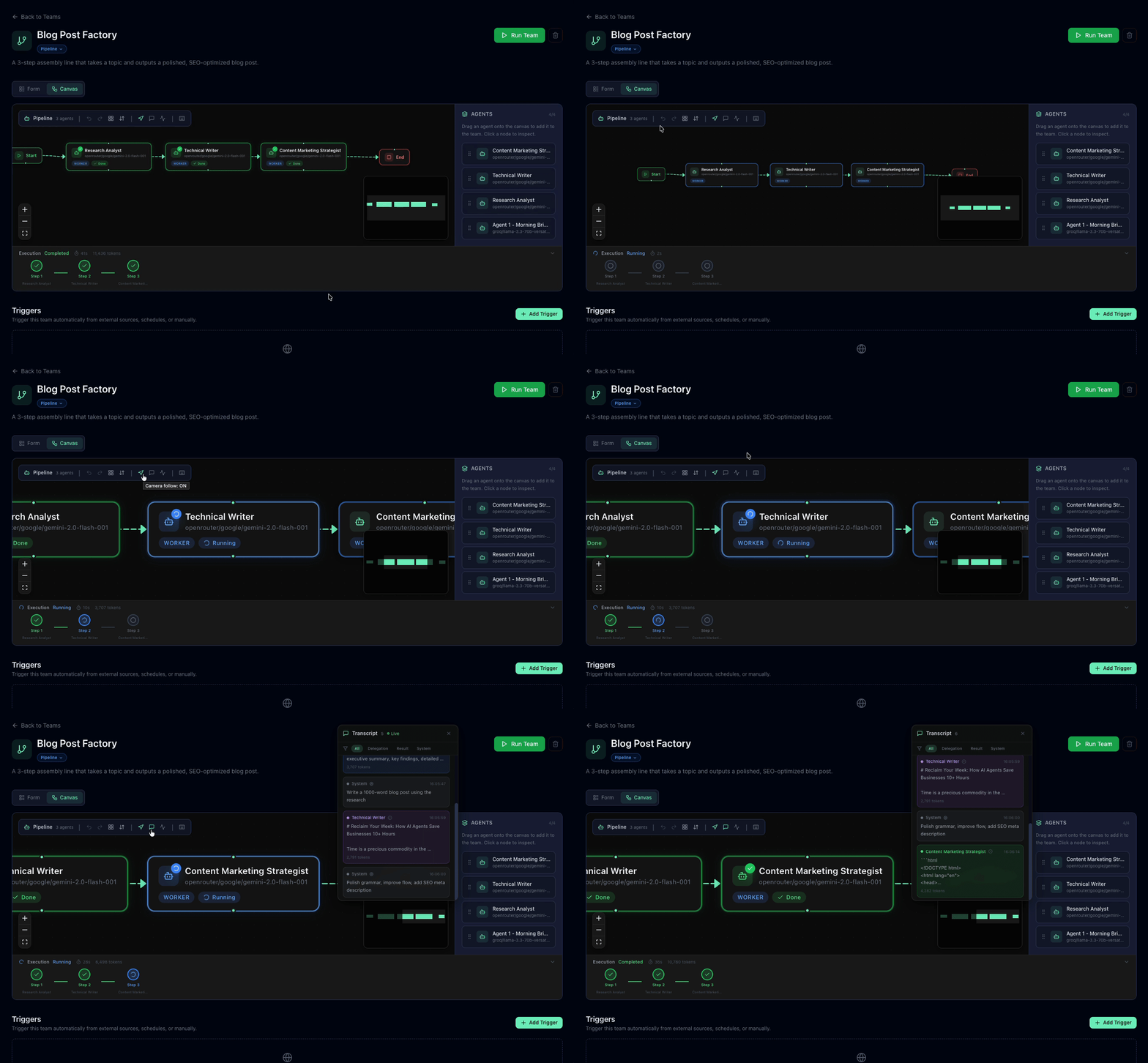 ## The problem In the original version, pipeline teams were configured through a dropdown-based step list. It worked, but it had real limitations: - You couldn't see the full flow at a glance - Rearranging steps meant tedious up/down clicking - Non-technical team members found it confusing - There was zero visual feedback during execution We needed a canvas where agents are nodes, connections are edges, and execution status updates in real-time. ## The stack Three pieces made this work: - **React Flow** — Canvas library. Nodes, edges, panning, zooming, selection, and minimap — all handled out of the box. - **Dagre** — Auto-layout engine. Given a directed graph, it computes x/y positions so nothing overlaps. - **Supabase Realtime** — Live execution state. The task runner pushes status updates, and the canvas highlights the active node instantly. ## Layout system: TB and LR One design decision that took a few iterations: directional layouts. Pipeline workflows naturally flow in one direction. Some people think top-to-bottom (like a flowchart), others think left-to-right (like a timeline). We support both. ```typescript const getLayoutedElements = (nodes, edges, direction = 'TB') => { const dagreGraph = new dagre.graphlib.Graph(); dagreGraph.setGraph({ rankdir: direction, nodesep: 80, ranksep: 100 }); dagreGraph.setDefaultEdgeLabel(() => ({})); nodes.forEach((node) => dagreGraph.setNode(node.id, { width: 220, height: 80 }) ); edges.forEach((edge) => dagreGraph.setEdge(edge.source, edge.target) ); dagre.layout(dagreGraph); // ... map positions back to React Flow nodes }; ``` The tricky part was **edge handles**. React Flow connects edges to specific handles (connection points) on each node — top, bottom, left, right. When you toggle from TB to LR, every edge needs its `sourceHandle` and `targetHandle` swapped: ```typescript function getHandleIds(direction: string) { return direction === 'LR' ? { sourceHandle: 'right', targetHandle: 'left' } : { sourceHandle: 'bottom', targetHandle: 'top' }; } ``` Without this, edges default to the first available handle and you get connections going the wrong direction. Obvious in hindsight — took a few rounds of debugging to catch. ## Inserting agents between steps This was the feature that turned the canvas from a visualisation into a real tool. Right-click any edge → **Insert Agent Here** → pick an agent → done. The new agent splits the edge into two, and dagre re-layouts everything automatically. Under the hood: 1. Remove the original edge (A → C) 2. Insert the new node (B) 3. Create two new edges (A → B, B → C) 4. Re-run dagre layout 5. Animate the transition with `fitView()` Simple in concept, satisfying in practice. ## Real-time execution When a pipeline runs, the canvas comes alive: - The active agent node gets a pulsing highlight - The camera auto-follows the executing node - A side panel streams the live transcript via SSE - Completed steps show a success indicator This is powered by Supabase Realtime subscriptions on the `team_runs` table. When the task runner updates a step's status, the canvas reflects it within milliseconds. ## Persisting layout preferences Small detail that matters: layout direction is saved per-team in the JSONB config column alongside the graph structure. When a user opens a team they set to LR last week, it opens in LR — no reconfiguration needed. One gotcha: we use `useRef` for shared layout state to avoid stale closures in React Flow callbacks. We hit that bug twice before learning the lesson — anything that edges or layout callbacks depend on should live in a ref, not plain state. ## What I'd do
Announcements
No announcements yet.
Community activity
Recent follows, shares, ratings, and collection saves for CrewForm.
No community activity yet. Follow or share CrewForm to get things started.
Comments
Sign in to join the discussion.